- Página de inicio /
- Productos de oficina /
- Electrónica de oficina /
- Productos de presentación /
- Presentation Remotes /
- AMERTEER Presentation Clicker Wireless Presen...
0 ratings






Nº de artículo:
5325018
AMERTEER Presentation Clicker Wireless Presenter Remote Clicker for PowerPoint Presentations with Red Pointer, PowerPoint Clicker Slide Advancer for
89% of respondents would recommend this to a friend
Nº de artículo:
5325018
NIO 700
Price Details
Excluding Shipping & Custom charges ( Shipping and custom charges will be calculated on checkout )
*All items will import from Estados Unidos
0 ratings
Escribe una opinión
En stock
 Importado de la tienda USA
QTY:
Haz tu pedido ahora y recíbelo por ahí Sábado, Noviembre 21
Secured transaction
Ubuy works hard to protect your security and privacy. Our advanced payment security system ensures confidentiality by encrypting your information during transmission using AES (Advanced Encryption Standards) and SSL (Secure Socket Layer) protocols. Your payment details are 100% secure as we do not share your payment details with third party sellers.
Our Top Logistics Partners


Stay engaged with your audience and highlight key areas of your slides effortlessly with our compact and ergonomic presentation clicker.

Fast
Shipping

Free
Return*

Secure Packaging

100% Original Products

PCI DSS Compliance

ISO 27001 Certified



What Stands Out
Multi-Platform Compatibility
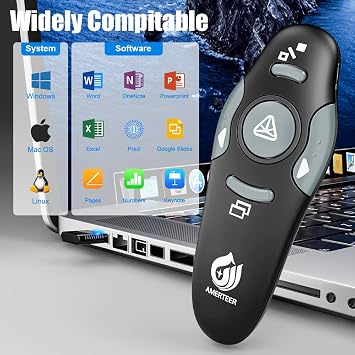
Works seamlessly with Mac, Windows, and Google Slides, ensuring versatility for diverse users and environments, making it the perfect tool for any presenter.
Red Laser Pointer
Equipped with a bright red laser pointer to highlight key points effectively, enhancing audience engagement and clarity in presentations.
User-Friendly Design
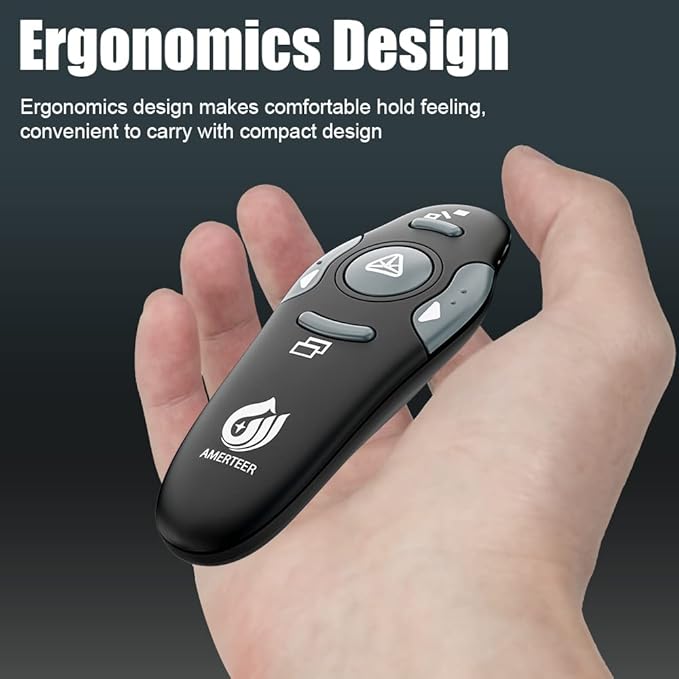
Ergonomically designed with intuitive controls for effortless navigation, allowing presenters to focus on their content without distraction during important talks.
Detalles de producto
| Additional Features | Ergonomic |
| Maximum Number of Supported Devices | 1 |
| Compatible Devices | Laptop |
| Connectivity Technology | USB |
| Button Quantity | 5 |
| Controller Type | Button Control |
| Maximum Range | 39 feet |
| Battery Type | AAA |
| Color | Black |
| Item Weight | 32 g |
| Item Dimensions L x W x H | 5.1"L x 3.5"W x 1.6"H (13 x 8.9 x 4.1 cm) |
| Brand | AMERTEER |
| Model Name | RCRF-008 |
| Model Number | RCRF-008 |
| Number of Items | 1 |
| UPC | 016463816300 |
| Unit Count | 1 Count |
| Number of Packs | 1 |
| Manufacturer | AMERTEER |
| Mfr Part Number | 100000135CA |
| Special Feature | Ergonomic |
| Max Number of Supported Devices | 1 |
Who Should Buy?

-
Educators
Teachers can effectively engage students during presentations with a reliable clicker that features a red laser pointer.
-
Business Professionals
Ideal for professionals conducting meetings or presentations, allowing for seamless slide transitions and enhanced audience interaction.
-
Remote Presenters
Perfect for individuals presenting remotely, offering wireless convenience and compatibility across various platforms, including Google Slides.

-
Occasional Users
Infrequent presenters may find the features unnecessary, opting for simpler solutions might be more cost-effective.
DESCRIPCIÓN DEL PRODUCTO
¿Tienes alguna consulta? Chatea con nosotros
Preguntas y respuestas de los clientes
-
Pregunta:
What features does the AMERTEER Presentation Clicker offer?
Respuesta: The AMERTEER Presentation Clicker is equipped with a variety of practical features including a wireless connection up to 100 feet away, a built-in laser pointer for highlighting key information during presentations, and a plug-and-play USB receiver that ensures immediate use without requiring software installations. This versatility makes it ideal for business meetings, classrooms, and public speaking events, where a smooth flow of presentation is critical. -
Pregunta:
What are the benefits of using a wireless presenter?
Respuesta: Using a wireless presenter like the AMERTEER clicker allows presenters to move freely around the room, engage with their audience, and maintain eye contact, which enhances communication. It also eliminates the need to stay tethered to a laptop, thus making it easier to demonstrate products, interact with attendees, or address questions effectively during the presentation flow. -
Pregunta:
How do I set up the AMERTEER Presentation Clicker?
Respuesta: Setting up the AMERTEER Presentation Clicker is straightforward. Simply plug the USB receiver into your computer's USB port and turn on the presenter. It usually doesn't require additional software, allowing you to start presenting instantly. This plug-and-play functionality helps streamline the preparation process, making it perfect for quick setups at meetings or conferences. -
Pregunta:
Is the red laser pointer bright enough for large spaces?
Respuesta: Yes, the red laser pointer on the AMERTEER Presentation Clicker is designed to be bright and visible even in large venues. The clarity of the pointer ensures that your audience can easily follow along with the key elements of your presentation, whether in a small conference room or a larger auditorium, providing a professional touch to your delivery. -
Pregunta:
Can I use the AMERTEER Clicker with any operating system?
Respuesta: The AMERTEER Presentation Clicker is compatible with a wide range of operating systems, including Windows, macOS, and Linux. This cross-platform compatibility makes it a versatile tool for users across different environments, ensuring that whether you're presenting at school, work, or a conference, the clicker will function seamlessly. -
Pregunta:
How far can I be from the receiver when using the clicker?
Respuesta: The AMERTEER Presentation Clicker operates within a wireless range of approximately 100 feet. This extended range allows you to move freely around the presentation space, engage with audience members, and ensure that your message is effectively conveyed without being restricted to a single spot. -
Pregunta:
Does the clicker require batteries?
Respuesta: Yes, the AMERTEER Presentation Clicker requires AAA batteries for operation. Ensure you keep spare batteries on hand, especially for important presentations, so that you can rely on your clicker without interruptions. With proper battery management, its consistent performance can enhance your presentation experience. -
Pregunta:
What type of presentations is the AMERTEER Clicker best for?
Respuesta: The AMERTEER Presentation Clicker is best suited for PowerPoint presentations, but it is versatile enough to work with any presentation software that supports slideshow functionality. Its design is ideal for business meetings, educational lectures, webinars, and public speaking engagements where presenting information clearly is vital. -
Pregunta:
Are there any specific safety precautions I should follow?
Respuesta: When using the AMERTEER Presentation Clicker, avoid pointing the laser light at people's eyes or reflective surfaces. It's also advisable to use the clicker in a well-lit venue to ensure visibility of the pointer. Being mindful of these safety precautions will contribute to a smooth and professional presentation, maintaining a focus on content delivery. -
Pregunta:
Where can I buy the AMERTEER Presentation Clicker in Nicaragua?
Respuesta: You can purchase the AMERTEER Presentation Clicker at Ubuy, which offers a wide selection of electronic products, ensuring quick access to the clicker along with detailed product information. Ubuy's reliable platform makes it simple to find and order the AMERTEER Presentation Clicker, setting you up for success in your next presentation.
AMERTEER Presentation Remotes RCRF-008 Editorial Review
AMERTEER Presentation Clicker Wireless Presenter Remote Clicker for PowerPoint Presentations with Red Pointer, PowerPoint Clicker Slide Advancer for Mac/Windows/Google Slide/PPT is a compact and efficient tool designed for effortless presentation control. Users appreciate its ergonomic design, which makes it easy to grip during extended use. The clicker supports a maximum range of 39 feet, ensuring that you can move freely while presenting. Compatibility with multiple systems including Mac, Windows, and Google Slides allows for versatile applications. Reviewers have highlighted its bright laser pointer feature, which serves well in various lighting conditions. With 5 buttons for simplified navigation, this presenter is an excellent choice for both casual users and seasoned professionals.
Customer Reviews & Ratings
1173 valoraciones de los clientes
-
5 estrella
75%
-
4 estrella
13%
-
3 estrella
5%
-
2 estrella
3%
-
1 estrella
4%
Revisar este producto
Comparte tus ideas con otros clientes
ventajas
- Ergonomic design for comfortable grip
- Bright laser pointer for clear visibility
- Compatible with multiple presentation software
- Compact size for easy portability
- Easy to understand button layout
Contras
- USB stick can be tricky to plug in
Platform Trust & Buyer Confidence

JK
Jasmin
Verified buyer
“Great products and very good service: very easy and very fast international delivery.”
9 September 2026 · via Trustpilot
AG
Anke
Verified buyer
“Wonderful online shopping experience, smooth transaction from the start. Payment method works conveniently and delivery is unexpectedly fast and reliable. You go the extra mile for service. What makes this even more amazing, you deliver to Namibia. I will remain a happy Ubuy customer and will increase my purchases for sure! Thank you!”
10 September 2026 · via Trustpilot
H
Hazel
Verified buyer
“Very easy to find the products what you need, and so fast delivery, that’s why I highly recommended to others costumers to used ubuy.”
10 September 2026 · via Trustpilot
O
Opaleye
Verified buyer
“I received exactly what I ordered I was skeptical about your site because that was my first time to order. But the order came timely and neatly packaged. I was not disappointed. Thank you.”
11 September 2026 · via Trustpilot
AC
Adele
Verified buyer
“Easy to find and order what you want on the website. Delivery is quick to the UK”
8 September 2026 · via Trustpilot
Pago seguro
Global Delivery
Easy Returns
Genuine Products
Product Price History
Información importante
- Limitaciones: Para los productos enviados al extranjero, ten en cuenta que cualquier garantía del fabricante puede no ser válida; las opciones de servicio del fabricante pueden no estar disponibles; los manuales del producto, las instrucciones y las advertencias de seguridad pueden no estar en los idiomas del país de destino; los productos (y los materiales que los acompañan) pueden no estar diseñados de acuerdo con las normas, especificaciones y requisitos de etiquetado del país de destino; y los productos pueden no ajustarse al voltaje del país de destino y a otras normas eléctricas (lo que requiere el uso de un adaptador o convertidor, si procede). El destinatario es responsable de asegurarse de que el producto puede ser importado legalmente al país de destino. Cuando hagas un pedido a Ubuy o a sus filiales, el destinatario es el importador registrado y debe cumplir todas las leyes y normativas del país de destino.
- No todos los productos que aparecen en Ubuy están a la venta, ya que Ubuy es un motor de búsqueda a nivel mundial. Los productos están sujetos a las normas de exportación/comercio.
NIO 700
Haz tu pedido ahora y recíbelo por ahí Sábado, Noviembre 21
This item is not restrict in my country.(Please click on above link if this item is not restrict in your country, So our team will review and allow.)
QTY:
Secured transaction
PCI DSS compliant and ISO 27001:2022 certified, with encrypted payments and full buyer protection on every order.
Our Top Logistics Partners
Fastest cross-border delivery
características y beneficios
- Bright red laser pointer enhances visibility against most backgrounds.
- Long control distance of up to 39 feet for audience interaction.
- Built-in docking bay for receiver ensures portability and reduces loss risk.
- Compact, ergonomic design for comfortable handling during presentations.
- Compatible with multiple software options for seamless presentations.
- One-touch keys facilitate easy slideshow control without distractions.
Ubuy Assurance
Experience worry-free shopping with 100% original products, PCI DSS-compliant payment security, ISO 27001-certified data protection, the fastest cross-border delivery, free returns *, and secure packaging on every order.